
Step 1: Go to the webshop
Go to shop.dopper.com. Choose the product you want to order, for example:
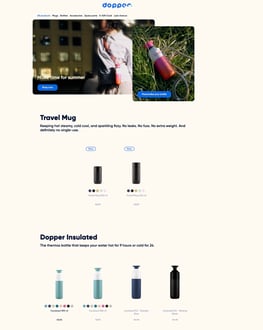
- a Dopper bottle
- a Dopper Travel Mug
- a cup
- an accessory
- a spare part
Step 2: Choose your product
On the product page, select the options you want. Depending on the product, this can include:
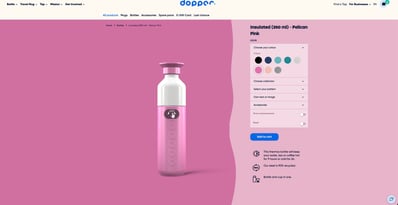
- colour
- size
- product type
- accessories
- personalisation
Step 3: Choose customisation or no customisation
Some Dopper products can be customised.
-
Without customisation
Want a regular, non-customised product? Just click Add to cart. This skips the customiser and adds the standard product directly to your cart.
- With customisation
Want to add a personal touch? Start customising from the product page.
Depending on the product, you can:
- choose a colour
- choose a size
- add text or a name
- choose a pattern
- upload your own image
- add an accessory
Without customisation
Don’t want to customise? No problem.
To add an uncustomised product to your cart:
-
Click "Add to cart"
-
Skip the customisation steps
-
You’ll receive a regular, non-customised product
Using a product overview page “Add to cart” button? That button skips the customiser automatically and adds the standard product directly to your cart.
With customisation
Once you’re on the product page, you can start customising straight away.
During the customisation process, you can:
-
Choose your product colour
-
Choose your product category (Dopper Original, Dopper Insulated, Dopper Steel) and/or size
-
Spice things up with one of the latest patterns and/or add text or a name
-
Add only text or a name
-
Upload an image (your cat, your face or your dad’s favourite plant)
-
Add an accessory to complete your product
When you’re done, click "Add to cart" and continue to checkout.
Only a (personalised) cup?
You can also order a cup on its own.
In the customiser:
-
Choose the collection (Dopper Original, Dopper Insulated, Dopper Steel, Dopper Glass)
-
Choose the size and colour
-
Choose the type:
-
-
-
Full bottle, or
-
Cup only
-
-
From there, you can customise your cup (or not):
-
Add a pattern or upload your own image
-
Add text or a name
When you’re ready, click "Add to cart". The cup will be added to your cart.
Finalize your order
Make the payment
Select your preferred payment method and complete the payment.
Order placed
After payment, you’ll be redirected back to the Dopper shop and arrive at the order confirmation page. Your order is complete. 🎉 You can now close the shop.